Prepare the project information your site team needs. Start with shared document libraries, then build towards iPhone field capture, inspection evidence and a structured record of the day.
Create a project, assign its members and upload the documents that support your site activities. Use the existing HESYS Microsoft sign-in.
Project document library
Upload PDF, PNG and JPEG files up to 10 MB. Use dedicated areas for RAMS and Method Statements, ITPs, and site plans. Keep programmes, forms and other project information alongside them.
Assigned project access
Project owners choose members and their roles. Editors upload and withdraw documents; viewers download. Product access and project membership are checked separately.
Client identity and site location
Add the client’s name and logo, a site address and a saved map pin. Uploaded site plans remain separate documents; they are not automatically placed over the map.
Document versions
Record a revision label for each upload and retain a record of recent project changes. A new upload is a separate version. Uploading does not approve a document or certify an inspection.
What the pilot covers
This first release is a web document portal. Optional OCR and project-document questions are available when enabled, with source references and owner-selected revisions. Processing covers up to the first 50 pages per file. Automatic malware scanning, formal document approval, configurable retention and iPhone synchronisation are not included. Follow your organisation’s document checking procedures and keep your source files. Read the account and project privacy information.
02 / PLANNED IPHONE WORKFLOW
Capture in the field.
In development
The planned iPhone app will connect field evidence to the project document library. It is not yet available on the App Store.
Photographs and site notes
Planned capture of photographs with date, time and location metadata, supported by construction activities, inspection categories and notes. Location capture will need the user’s permission.
Maps and site plans
Planned map views showing where evidence was captured, with uploaded site plans for locations where mapping is unsuitable.
Working without a signal
Encrypted local capture and later secure synchronisation are planned. Offline storage, background transfers and conflict handling still need implementation and device testing.
03 / PLANNED REVIEW & REPORTING
Evidence supports engineering judgement.
Planned
AI-assisted drafts
We plan optional AI assistance to prepare draft health and safety and technical observations, relate photographs to project information and suggest report wording. The document pilot supports source-linked questions about selected uploaded documents. Photo interpretation and automatic report drafting remain planned.
Inspection records
Planned ITP hold-point records, evidence, sign-off workflows, daily diaries and inspection reports, with traceable links between activities, photographs and supporting documents.
Human review
The Site Representative will remain responsible for reviewing, editing and accepting observations and reports. AI will not certify compliance, guarantee hazard detection or replace a competent person.
04 / CONNECTED SITE MONITORING
From installed gauges to an engineering dashboard.
Proposed integration
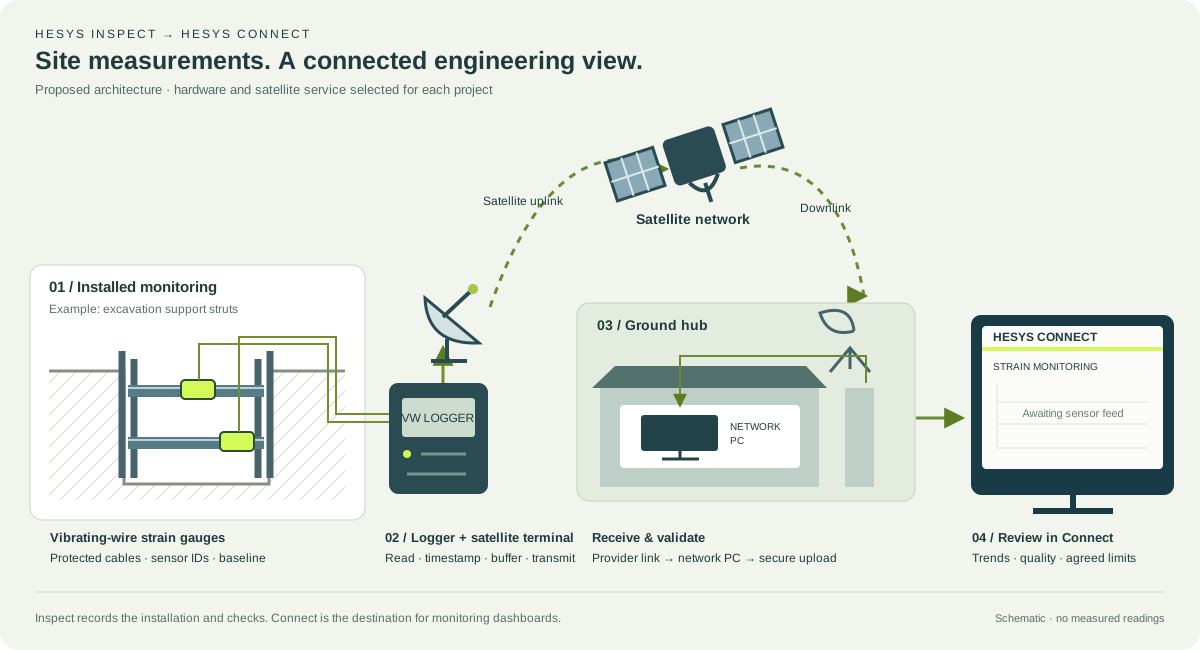
Plan vibrating-wire strain gauge installations with HESYS Inspect, then bring the readings into HESYS Connect. The proposed workflow links the instrument on site, its installation record and a remote dashboard through a logger and satellite connection.
Proposed site-to-dashboard architecture. Open the graphic for a larger view. The gauges connect to a compatible logger; the satellite terminal provides the remote communications link.
Install & record
Fit gauges to the agreed monitoring design. Record the sensor ID, location, orientation, calibration details, photographs and initial readings in the installation record.
Log on site
A compatible vibrating-wire logger reads the gauges and associated temperature channels. Agree sampling intervals, local storage, power supply and cable protection for the installation.
Transmit by satellite
The site terminal sends readings through the selected satellite service and its ground gateway. The project network PC receives the data through the provider’s supported interface.
Upload & review
The network PC checks timestamps, channel identities and data quality before secure upload to HESYS Connect. The intended dashboard brings trends, baselines and agreed review limits together.
Where it can be used
Example applications include excavation struts and walers, steel members, piles and concrete elements. Surface-mounted or embedded instruments are selected to suit the structure and monitoring objective.
What the dashboard should show
Strain change in microstrain (µε), temperature, baseline date, sensor location and reading time. Include gaps, stale readings and logger or communication status alongside the trends.
Engineering interpretation
Strain is not a direct load measurement. Any conversion to stress or member force needs a checked model, material and section properties, temperature treatment and consideration of bending and restraint.
Build the connection around the site.
HESYS Connect already has a staff-only mTBM dashboard concept in the portal. The vibrating-wire feed, satellite interface, network-PC uploader and strain dashboard described here are proposed additions, not commissioned services. Instrument compatibility, satellite coverage and clear sky view, power, security, update interval and project response limits need to be agreed and tested for each deployment.
The document pilot uses the HESYS-hosted Azure service. Customer-managed cloud and local or on-premises packages are planned options; they are not currently available.
Contact us to discuss confidentiality, data location, retention, project roles and reporting requirements before using the pilot with sensitive information.